> ## Documentation Index
> Fetch the complete documentation index at: https://docs.presenton.ai/llms.txt
> Use this file to discover all available pages before exploring further.

# Text editing

> Add text blocks, rewrite copy, and format text on the slide.

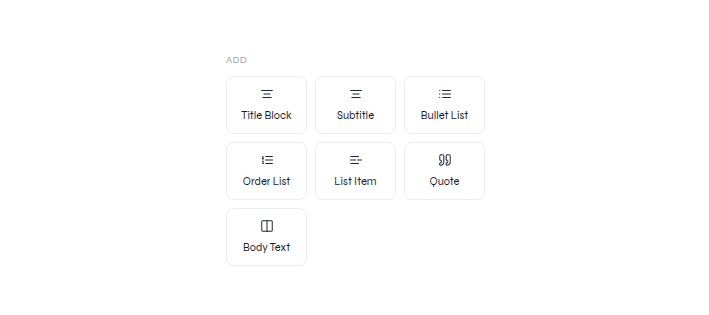
Open **Texts** to add a **Title Block**, **Subtitle**, **Bullet List**, **Order List**, **List Item**, **Quote**, or **Body Text**.

<div className="guide-media guide-media--panel">
  <p className="guide-media-label">Text blocks available from the editor rail</p>

  <div className="guide-media-viewport">
    <img src="https://mintcdn.com/presenton-521d9e2f/isevrd3o6JPIkznF/images/user-guide/editing-and-refining/canvas/text-library-panel.png?fit=max&auto=format&n=isevrd3o6JPIkznF&q=85&s=9127ad0ab495f986dd90322bf7c5e64e" alt="Texts panel with title, subtitle, list, quote, and body text options" width="709" height="315" data-path="images/user-guide/editing-and-refining/canvas/text-library-panel.png" />
  </div>
</div>

## Add a text block

<div className="guide-media guide-media--workflow">
  <p className="guide-media-label">Add Body Text, enter content, and place it on the slide</p>

  <div className="guide-media-viewport">
    <video className="doc-video" controls preload="metadata" src="https://mintcdn.com/presenton-521d9e2f/isevrd3o6JPIkznF/images/user-guide/editing-and-refining/canvas/text-add.mp4?fit=max&auto=format&n=isevrd3o6JPIkznF&q=85&s=9fe5d2154e612691f908733e79a983e5" data-path="images/user-guide/editing-and-refining/canvas/text-add.mp4">
      Your browser does not support the video tag.
    </video>
  </div>
</div>

1. Choose a text block from **Texts**.
2. Enter the required copy.
3. Position the new text without covering existing content.

## Edit existing text

<div className="guide-media guide-media--workflow">
  <p className="guide-media-label">Select existing text, rewrite it, and use the visible text toolbar</p>

  <div className="guide-media-viewport">
    <video className="doc-video" controls preload="metadata" src="https://mintcdn.com/presenton-521d9e2f/isevrd3o6JPIkznF/images/user-guide/editing-and-refining/canvas/text-editing.mp4?fit=max&auto=format&n=isevrd3o6JPIkznF&q=85&s=ba2ee248473f4229fffbd79768a56069" data-path="images/user-guide/editing-and-refining/canvas/text-editing.mp4">
      Your browser does not support the video tag.
    </video>
  </div>
</div>

1. Select the text element and enter text editing.
2. Rewrite the selected copy.
3. Apply the required formatting from the visible toolbar.
4. Check hierarchy, wrapping, contrast, and overflow.

<Card title="Rewrite with a prompt" icon="wand-magic-sparkles" href="/archive/v0.9.1-beta/user-guide/editing-and-refining/editing-with-prompts">
  Use a focused AI request when the wording—not only the formatting—needs to change.
</Card>
