> ## Documentation Index
> Fetch the complete documentation index at: https://docs.presenton.ai/llms.txt
> Use this file to discover all available pages before exploring further.

# Slide Editing

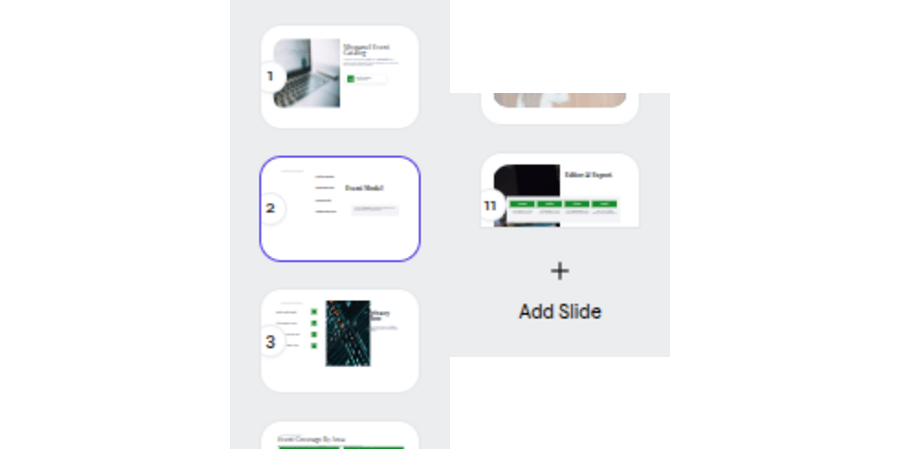
> Select slides and add a new slide from the thumbnail rail.

The supplied editor capture verifies slide selection and the **Add Slide** control.

<div className="guide-media guide-media--panel">
  <p className="guide-media-label">Select a slide or use Add Slide from the thumbnail rail</p>

  <div className="guide-media-viewport">
    <img src="https://mintcdn.com/presenton-521d9e2f/isevrd3o6JPIkznF/images/user-guide/editing-and-refining/overview/slide-rail.png?fit=max&auto=format&n=isevrd3o6JPIkznF&q=85&s=71bbec888ceef8d7f5048ed0f0a71ebe" alt="Selected slide thumbnails and the Add Slide control in the editor rail" width="900" height="450" data-path="images/user-guide/editing-and-refining/overview/slide-rail.png" />
  </div>
</div>

<Steps>
  <Step title="Select a slide">
    Choose its thumbnail to make it active.
  </Step>

  <Step title="Add a slide">
    Select **Add Slide**, then add content from the canvas editor or with AI.
  </Step>

  <Step title="Review the sequence">
    Check the transition from the previous slide and into the next slide.
  </Step>
</Steps>

<div className="asset-placeholder">
  <div className="asset-placeholder-inner">
    <p className="asset-placeholder-kicker">Capture needed</p>
    <p className="asset-placeholder-title">Duplicate, delete, and reorder slides</p>
    <p className="asset-placeholder-description">The supplied media does not show these controls. Add a focused product capture before publishing procedural steps.</p>
  </div>
</div>

<CardGroup cols={2}>
  <Card title="Build slide content" icon="object-group" href="/archive/v0.9.1-beta/user-guide/editing-and-refining/canvas-editor">
    Add and edit content directly on the slide.
  </Card>

  <Card title="Create content with AI" icon="sparkles" href="/archive/v0.9.1-beta/user-guide/editing-and-refining/ai-assistant">
    Request one focused change for the active slide.
  </Card>
</CardGroup>