> ## Documentation Index
> Fetch the complete documentation index at: https://docs.presenton.ai/llms.txt
> Use this file to discover all available pages before exploring further.
# Presentations and slides
> Learn how outlines, slides, templates, layouts, and editable elements fit together.
Presenton builds a presentation as a sequence of slides. The outline controls the story; the template controls the visual system; each slide combines content with a suitable layout.
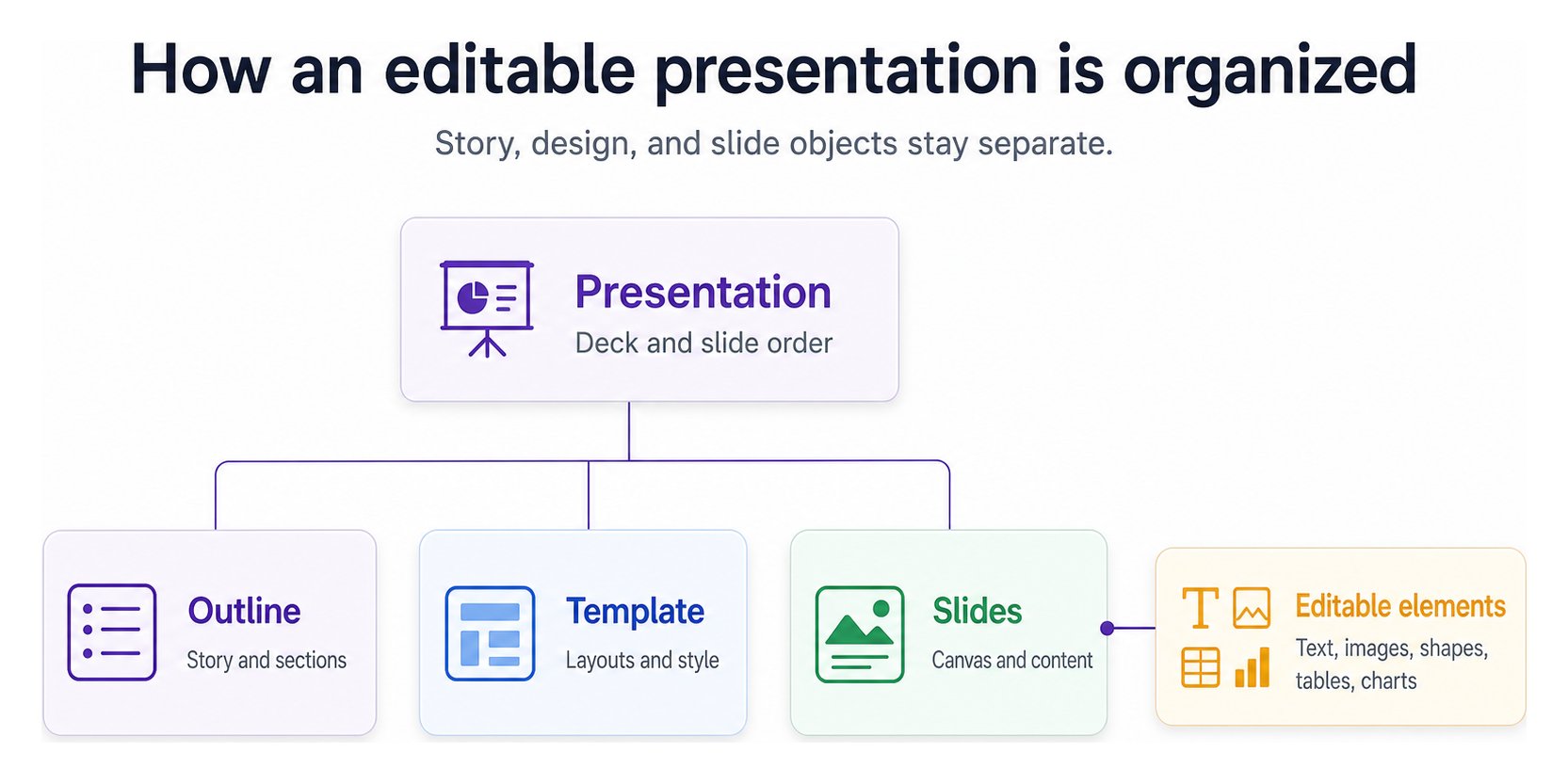 ## The building blocks
| Concept | What it controls | Change it when… |
| ------------ | ------------------------------------------------------- | ------------------------------------------------ |
| Presentation | The complete deck and slide order | The story needs a different sequence |
| Outline | The planned message for each section or slide | An idea is missing, repeated, or misplaced |
| Template | Reusable design choices and available layouts | The deck must follow another brand or style |
| Layout | The arrangement of content on one slide | The current composition does not fit the message |
| Element | A text, image, shape, table, chart, or supported object | A specific part of the slide needs correction |
## Standard and Smart formats
Standard presentations use predefined, reusable layouts. Choose this format when consistency and predictable content placement matter. A template provides the layout options used during generation.
Smart presentations use a design reference to guide more adaptive slide composition. This format is available in Cloud for workflows that need more visual variation.
The current open-source application documents **Standard**. It uses reusable layouts and represents each slide as structured JSON rendered onto a `1280 x 720` editing canvas. Components and nested elements retain their geometry and styling, allowing direct selection, rich-text editing, drag-and-drop movement, transforms, layering, data editing, and targeted AI changes.
## What remains editable
| Object | Typical controls |
| ------------------------- | --------------------------------------------------------------------------------- |
| Text and lists | Content, typography, formatting, alignment, position, size, and rotation |
| Images | Source, fit, crop, flip, radius, opacity, position, and size |
| Shapes and lines | Fill, stroke, radius, shadow, opacity, position, and geometry |
| Tables | Cell content, rows, columns, ordering, and text alignment |
| Charts | Type, data, series, titles, values, axes, gridlines, labels, colors, and opacity |
| Components and containers | Position, dimensions, rotation, opacity, layering, padding, alignment, and layout |
| Slides | Layout, order, duplication, deletion, and AI-assisted changes |
Fix a story problem in the outline, a deck-wide visual problem in the template, and a local content problem on the slide. Choosing the right level avoids repetitive edits.
Prepare reusable layouts for branded generation.
Check which formats are documented for each mode.
## The building blocks
| Concept | What it controls | Change it when… |
| ------------ | ------------------------------------------------------- | ------------------------------------------------ |
| Presentation | The complete deck and slide order | The story needs a different sequence |
| Outline | The planned message for each section or slide | An idea is missing, repeated, or misplaced |
| Template | Reusable design choices and available layouts | The deck must follow another brand or style |
| Layout | The arrangement of content on one slide | The current composition does not fit the message |
| Element | A text, image, shape, table, chart, or supported object | A specific part of the slide needs correction |
## Standard and Smart formats
Standard presentations use predefined, reusable layouts. Choose this format when consistency and predictable content placement matter. A template provides the layout options used during generation.
Smart presentations use a design reference to guide more adaptive slide composition. This format is available in Cloud for workflows that need more visual variation.
The current open-source application documents **Standard**. It uses reusable layouts and represents each slide as structured JSON rendered onto a `1280 x 720` editing canvas. Components and nested elements retain their geometry and styling, allowing direct selection, rich-text editing, drag-and-drop movement, transforms, layering, data editing, and targeted AI changes.
## What remains editable
| Object | Typical controls |
| ------------------------- | --------------------------------------------------------------------------------- |
| Text and lists | Content, typography, formatting, alignment, position, size, and rotation |
| Images | Source, fit, crop, flip, radius, opacity, position, and size |
| Shapes and lines | Fill, stroke, radius, shadow, opacity, position, and geometry |
| Tables | Cell content, rows, columns, ordering, and text alignment |
| Charts | Type, data, series, titles, values, axes, gridlines, labels, colors, and opacity |
| Components and containers | Position, dimensions, rotation, opacity, layering, padding, alignment, and layout |
| Slides | Layout, order, duplication, deletion, and AI-assisted changes |
Fix a story problem in the outline, a deck-wide visual problem in the template, and a local content problem on the slide. Choosing the right level avoids repetitive edits.
Prepare reusable layouts for branded generation.
Check which formats are documented for each mode.